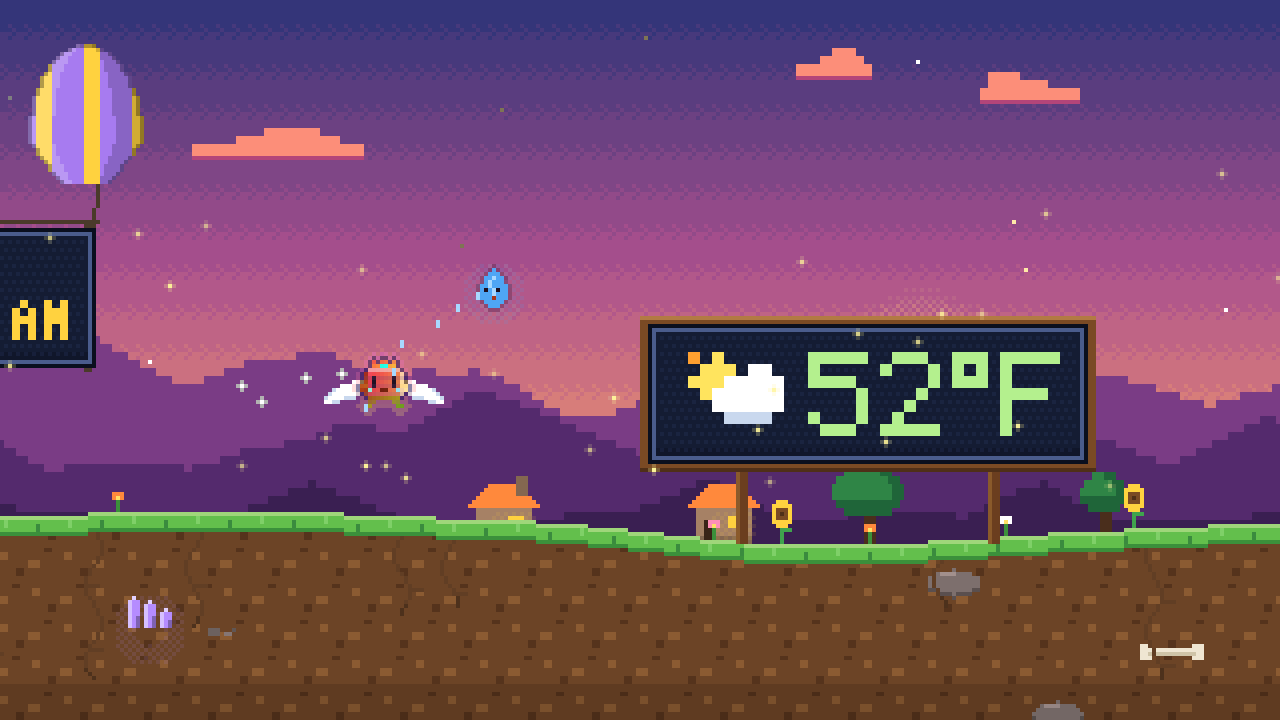
Archon travels an endless pixel world while the time, date and temperature drift past on signposts, blimps and balloon banners. He sprouts wings, drives a flying car, launches rockets, tunnels underground in a digger and dives in a submarine, and now and then a stranger wanders into the scene.
Windows 10 or 11 (64-bit) · macOS 11 or later, Apple Silicon and Intel · No account, no ads.
No malware, no spyware, no tracking. The full source code is included, so you can check. What it does and doesn't do
Screensavers run on computers. Open this page on your Windows PC or Mac to download it.
Download started. The install steps are just below.
Archon rides
Earth & sea
On the road
On the water
Backdrop
Season
Visitors
Signs held up by
ClockUnits
WeatherShowing a sample temperature.
This is the real screensaver engine running in your browser. The time and date are yours. The temperature is a sample until you choose to use your local weather, which sends your approximate location to a weather service from this page.
What you'll see
Nothing is scripted to the minute. Archon keeps changing how he travels, the landscape keeps changing around him, and the signs keep telling you the time.
Time, date and temperature
Three signs take turns. The time has a blinking colon. The date shows the day number with the weekday and month. The temperature comes with a weather icon for sun, cloud, rain, snow, storm or fog.
They hang on roadside signposts, blimps with LED screens and two-balloon banners. In space they ride on satellites.
Ten ways to travel
Archon walks the rolling hills, then switches things up. He grows wings, drives a flying car that lifts off after a short drive, floats in a hot-air balloon, rides a magic carpet or straps on a jetpack. He can also head down: a drill-nosed digger tunnels deep underground, a yellow submarine dives under the waves, and a little sailboat crosses the surface.
The rocket gets a full trip. Countdown on the pad, lift-off through the clouds, a cruise past planets and a moon, then a landing.
Guests with no schedule
A fox, a slime or a robot may tag along for a while, and sometimes a blue friend who looks a lot like Archon. Wisps of fire, water, earth and air float beside him.
Others only pass through. A ghost, a flock of birds, a wizard on a broom, a dragon breathing fire, a UFO with a tractor beam. Which one comes next is a surprise.
Down below there are more. Hedgehogs, worms, moles and beetles live in little pockets in the earth. Under the water you may pass fish, jellyfish, turtles, crabs, octopuses and the odd whale, and a dolphin sometimes leaps beside the sailboat.
Landscapes that blend
Meadows, deserts, autumn forests, dusk villages, ember wastes, starry nights, crystal twilight and frozen peaks fade into one another as Archon travels. Every start picks a new place, and the route never repeats.
The seasons turn on their own, too. Spring blossom, summer green, autumn leaves and winter snow follow one another in an order that never repeats.
Set it up your way
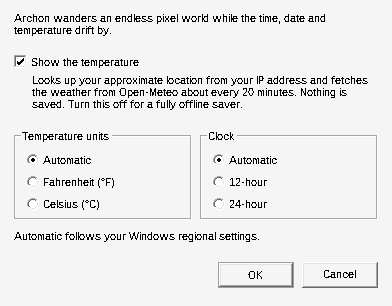
Choose a 12-hour or 24-hour clock, Fahrenheit or Celsius, and whether the temperature sign appears at all. By default it follows your computer's regional settings.
On Windows these live in the Settings button of Screen Saver Settings. On a Mac they follow Language & Region, with optional overrides in the Mac steps.
Screenshots
Every image here was captured from the screensaver itself. Select one to see it full size.
Wings over a dusk meadow, with the temperature on a roadside sign.A rocket cruising through space past a satellite sign.Lift-off at night. The date and time keep drifting past.The flying car above frozen peaks.A magic carpet crossing the desert.A hot-air balloon at dusk, and a dragon overhead.A ghost, a wizard and a dragon crash the same scene.A UFO beams something up while the date floats by.11°C on a blimp over the ember wastes.A digger tunnelling under a dusk village, with the date and time signs underground.A mole and a worm in their cave pockets.A submarine, a turtle and a jellyfish in a violet twilight sea.A whale swims past the submarine.A dolphin leaps beside the sailboat.Spring: blossoms and a fox at dusk.Summer: sunflowers, a sunny sky and a UFO with a tractor beam.Autumn leaves and a fox at dusk.Winter: snowfall, a snowman and white mountain tops.On the road: Archon on a bicycle, with rolling hills behind.A semi truck passing a city skyline.A forklift rolling through a suburb at dusk.An electric car and a forest backdrop, with each sign in its own colour.A pickup on farmland at dusk.A pink roadster after dark.A city at night, windows lit, with the time on a signpost.A forest backdrop and a blimp with its display well inside the hull.A tugboat, puffing along.A jet ski with a rooster tail.A speedboat.A duck floatie, in no hurry.A cruise ship, with a pier at each end.The cruise ship after dark.A skateboard, with the odd ollie.A Segway.Some signs are carried by drones.Others by a flock of birds.A rocket and a beating heart.Archon's own balloon, crown and all, next to a flower balloon that slowly turns.A fox balloon.A mirror-ball balloon that flashes as it drifts.A sleepy crescent moon.A few more dogs.The wizard rides a crescent moon.
A 2½-minute tour
Walking, wings, the flying car, a full rocket trip, a balloon, a carpet, a jetpack, then a fox, a UFO and a dragon. After that come the digger, the submarine, the sailboat and all four seasons.
Download
Free. The files are small, there is nothing to sign up for, and the screensaver needs no account.
Want to read the code or build it yourself? Download the source. It is portable C, and the zip includes build instructions.
Install in three steps
Pick your computer. Each step says exactly what to click, and the fixes for the usual warnings are underneath.
Download and unzip
Select Download for Windows. When it finishes, open your Downloads folder, right-click ArchonsLife-Windows.zip, choose Extract All, then Extract.
Run the files from the extracted folder, not from inside the zip.
ArchonsLife-Windows.zip
Open
Extract All…
Properties
Right-click ArchonsLife.scr and choose Install
Windows asks for permission to continue. Select Yes. A few seconds later, Screen Saver Settings opens with ArchonsLife already selected.
ArchonsLife.scr
Install
Test
Configure
Open with…
Properties
Set the wait time
In the Wait box, enter how many idle minutes should pass before the screensaver starts, then select OK.
Select Preview to watch it right away. Select Settings… to change the clock, the temperature units or the temperature sign.
Screen Saver Settings
ArchonsLife▾
Settings…Preview
Wait: 5 minutes
OKCancelApply
Want a quick look first? Double-click ArchonsLife.scr, or right-click it and choose Test. Press any key or move the mouse to close it.
"Windows protected your PC"
ArchonsLife.scr is not code-signed, so SmartScreen warns about it the first time. Select More info, then Run anyway.
The file is blocked, or Install does nothing
Right-click the zip before you extract it (or the .scr afterwards), choose Properties, tick Unblock at the bottom, and select OK. Then try Install again.
A firewall asks about internet access
That is the temperature lookup. Allow it to see the temperature. If you block it, everything else works the same and the temperature sign is simply left out. Details.
How to uninstall
Search the Start menu for "screen saver", open Change screen saver, choose (None) and select OK. Then delete C:\Windows\System32\ArchonsLife.scr.
Optional: the screensaver stores only your three settings, in HKEY_CURRENT_USER\Software\ArchonsLife. You can delete that key too.
Download and unzip
Select Download for Mac. Double-click the zip in your Downloads folder. You get a folder named ArchonsLife-Mac.
ArchonsLife-Mac
Install Archon's Life.command
ArchonsLife.saver
README-Mac.txt
Right-click the installer and choose Open
Right-click (or Control-click) Install Archon's Life.command and choose Open. macOS asks if you are sure because the file did not come from the App Store. Select Open.
A Terminal window appears for a moment while the screensaver is copied into your Screen Savers folder.
Install Archon's Life.command
Open
Open With
Get Info
Pick it in System Settings
System Settings opens on Screen Saver. Scroll down the list, choose Archon's Life (it sits under Other) and set how long your Mac waits before it starts.
Prefer to install by hand? Double-click ArchonsLife.saver and choose Install for this user only.
Screen Saver
Aerial
Landscape
Other
Archon's Life
macOS says it can't verify the file
The screensaver is not signed with an Apple Developer ID, so Gatekeeper is cautious. Open System Settings, go to Privacy & Security, scroll to the message about Archon's Life and select Open Anyway.
Or remove the download flag in Terminal, then open the installer again:
xattr -cr ~/Downloads/ArchonsLife-Mac
The preview is blank, or Archon's Life is missing from the list
Double-click Build from source (only if the saver won't load).command. It builds the screensaver on your own Mac with Apple's free command line tools (macOS offers to install them) and installs that copy instead.
The temperature doesn't show
macOS limits what screen savers can do online. If the lookup is blocked, everything else still works and the temperature sign is left out. Details.
Change units or turn the temperature off
The clock and units follow Language & Region. To override them, paste any of these into Terminal, then let the screensaver start again:
defaults write com.archonslife.screensaver Weather -bool NO
defaults write com.archonslife.screensaver Units -string C
Use F and 12 for the other choices. To undo everything, run defaults delete com.archonslife.screensaver.
How to uninstall
Quit System Settings. In Finder choose Go, then Go to Folder…, enter ~/Library/Screen Savers and delete ArchonsLife.saver.
The temperature sign and your privacy
Everything in Archon's Life runs on your computer. The one exception is the temperature sign. While the screensaver is running it makes two requests:
It asks a free IP-location service (ipwho.is, with get.geojs.io as a backup) roughly where your internet connection is, down to the city.
It asks Open-Meteo for the current weather there, with the position rounded to 0.1 degree, and asks again about every 20 minutes.
Those services can see your IP address, the same as any website you visit. Nothing is saved on your computer, and Archon's Life has no server of its own, so it never receives your location or anything else.
You are in control
Offline, or with the option switched off, the temperature sign is left out and the screensaver shows time and date. A VPN makes the sign show the weather near the VPN server.
Windows: open Screen Saver Settings, select Settings… and untick Show the temperature. The little preview in that window never goes online.
Archon's Life is a screensaver and nothing more. It is a small program written in plain C, and every line of its source code is in the download, so anyone can read exactly what it does.
What it does not do
It does not collect, record or send anything about you. There are no ads, no analytics, no accounts, and no server of its own to send anything to.
It does not read your files, photos, clipboard, camera, microphone or what is on your screen.
It does not log what you type. It only notices that a key was pressed or the mouse moved, so it knows when to close.
It does not install anything extra, add itself to startup, or keep running after the screensaver closes.
Its only use of the internet is the temperature lookup described above, and you can switch that off.
Check it yourself
Compare your download's SHA-256 checksum with the one in the Download section. A match means it is exactly the file published here.
On a Mac, open the install script in TextEdit first. It is a few plain lines: it copies the saver into your own Screen Savers folder and asks for no password.
On Windows, Install uses Windows' own screensaver installer, so Windows asks your permission first.
Want a second opinion? Upload the zip to VirusTotal and see what the scanners say.
The warning you see the first time you open it is Windows or macOS saying it does not recognize a new, unsigned program. It is not a finding about what is inside. More in the questions below.
Questions
Is it free?
Yes. Download it, use it, and share it with friends.
Is it safe? Does it have malware or spyware?
No. Archon's Life has no malware and no spyware. It has no ads, tracking or accounts, it never reads your files or what you type, and its only use of the internet is the optional temperature lookup. The full source code is in the download and you can check your file against the published checksums. What it does and does not do.
Does it work offline?
Yes. Only the temperature sign needs the internet. Without it you still get the time, the date and the whole world.
Does it work on more than one monitor?
Yes. Each display gets its own world.
Does it use a lot of power?
It draws a small 320 by 180 pixel picture and scales it up to fill your screen, which keeps the work light.
Which Windows and Mac versions does it support?
It is built for Windows 10 and 11 (64-bit); older versions aren't supported. On a Mac, macOS 11 or later on Apple Silicon and Intel, and macOS 10.13 or later on older Intel Macs.
Why do Windows and macOS warn me?
The files are not code-signed, because signing certificates cost money every year. The warnings are expected. The install steps show how to get past each one, and the checksums let you confirm your download is the one published here.
Where does the time come from?
Your computer's clock. The date uses the same clock.
Does it save anything?
On Windows it keeps your three settings (temperature on or off, units, clock format) in your own user account. On a Mac it saves nothing unless you run the optional Terminal commands.
Can I change which signs appear?
The time, date and temperature take turns by design. You can turn the temperature off, switch between 12 and 24 hours and choose Fahrenheit or Celsius.